Lesson 3 – Algorithms

Last week we learned about the basic functions in programming languages. As you have seen we have not yet, aside from uploading the quick “blink” code to our Arduino to check our system setup, actually written any real computer code. There are two reasons for this and there is a lot of debate in the industry and education on the correct approach to teaching Computer Science.
(1) I believe that it is important to understand the basic principles (theory) before learning the details. (practice) of programming.
(2) We can learn the theory without even owning a computer much less having to have direct access to one during the class time.
I sincerely hope you all understood the basic functions from last week’s lesson as they are critical in moving forward with this week. So, to start out I will re-introduce these basic functions and provide you with some standard symbols used in representing them while learning about algorithms.
VARIABLES
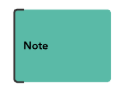
Are ussually not fully represented in a flow chart, however when they are required to understand the algorithm They are usually added along side the impacted Processes as notes using this symbol:
INPUT FUNCTIONS
Input functions have a couple of different symbols depending on where the input is coming from, as they can be either:
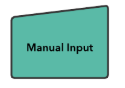
Manual Inputs (Entering Text on keyboard)
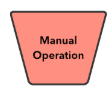
Manual Operations (like pushing a button)
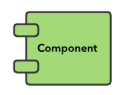
Components (Read from Sensors)
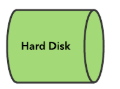
Hard Disk (Read from file)
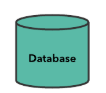
Database (Read from a database)
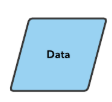
They are usually placed to the side of a Data symbol.
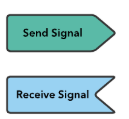
Components may also be connected to block for sending and receiving signals when more detail is required in the flowchart.
OUTPUT FUNCTIONS
Output functions are represented in three different ways depending on where they are heading:
They may go to a component like a motor controller in which case it matches the above Component symbol.
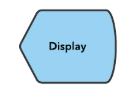
They may go to a screen or display which uses the Display Symbol
They may go to a Database and use the database symbol from above
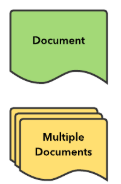
They may go to a file on the disk , or multiple files on a disk which would use the Document symbols
IF-THEN-ELSE and CASE STATEMENTS
These are branches in the code and are represented with the same symbol in a flow chart. They are a decision point
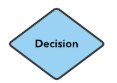
In the flow chart the decision can branch the code in two directions (TRUE or FALSE) it is common practice for TRUE to flow downwards and FALSE to flow to the right.A case statement would result in a series of Decision blocks.
LOOPS
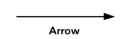
Loops do not have a symbol aside from the arrow which shows the direction of flow for the algorithm. For loops would include a decision based on the value of the for-loop variable, as would while loops. It is also possible to have an endless loop, which is the case in all Arduino code because it is expected to repeat it’s task forever.
OTHER SYMBOLS
There are a few other symbols used in flow charts as we describe algorithms:
Sometimes we want to perform an operation like adding multiple input values where we would flow the output of several branches into a Summing junction

We also start and end algorithms with Start and End symbols

We may get too large to fit the diagram on one page and then we need a connection to show the flow continues on another page:

There may be times that the flow overlaps too much making it hard to follow a given path and we need to use an on-page connector.

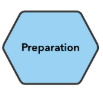
There are times when we might want to note that certain steps are preparation and not really part of the algorithm we would put these steps in a Preparation symbol.
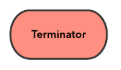
And the very last symbol I plan to use in teaching the algorithms is the Terminate which is used for when an algorithm exits early due to an error state.
Algorithms
What is an algorithm? It is a step-by-step process to solve a problem or perform a task. Most of the time an algorithm is thought of as a mathematical process, but you can have an algorithm for making a peanut butter and jelly sandwich. We will start by showing a few simple classic algorithms and then you will have an assignment to see if you can figure out the algorithms for some other cases on your own.
Checking for Odd or Even
Input a number
find the remainder when divided by 2
if remainder is 0 print even
else print odd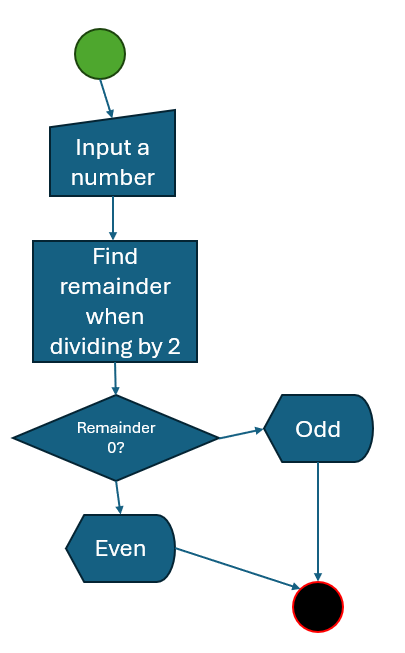
What if you don’t have a function already to find the remainder? I can tell you that we do have one on the ardunio and in most modern programming languages, but early programming languages did not so I will show you how we did it before the “modulo” function existed, by another algorithm.
Input a number
Input a divisor
subtract the divisor from the number and store it as remainder
If remainder is less than divisor print remainder
else keep subtracting the divisor from remainder and check again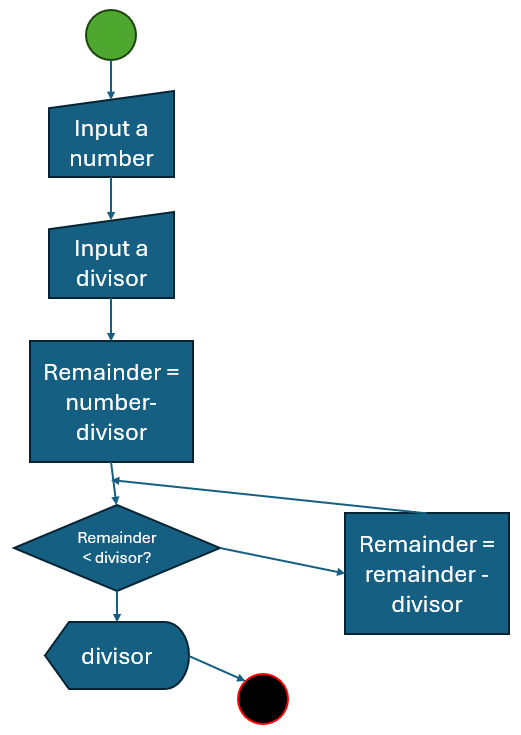
Now for your homework I would like to see if you can come up with algorithms for the following Problems. They are all fairly easy and you can write step by step instructions instead of using a flow chart if you like.
Simple Problems
- Create an algorithm that prints the multiplication tables up to 10 for any given number.
- Create an algorithm that adds all natural numbers before and including the input number for example if the input is 3 then add 1 + 2 + 3 and output 6.
- Create an algorithm that adds the squares of Natural numbers. For example if you input 3 you add 1 + 4 + 9 and output 14.
- Swap two numbers: Example if you input 7, 6 then output 6, 7
- Dice problem: You roll a dice and input the number on the top face, the program needs to print out the number on the bottom face of the dice.
Easy Problems
- Check if the input number is a prime number, A prime number is a number greater than 1 that has no positive divisors other than one and itself.
- Calculate the distance between two points on a graph.
- Find the least common multiple of two numbers.
Medium Problems
- Find the largest prime factor of a number, remember from above what a prime number is and find the largest one that you can divide the input number by with no remainder.
Hard Problem
- Solve the Towers of Hanio problem, which is the steps necessary to move a stack of disks from one tower to another without setting a larger disk on a smaller one. Big bonus points if you can figure this one out without cheating and looking up the answer online.
I will provide the answers in class next Friday and I may give you a quiz to see if you can determine the output of a random algorithm because you need to understand algorithms in both directions, how to write one to solve a given problem and how to identify the problem an algorithm is designed to solve.