“Emulators Everywhere!”
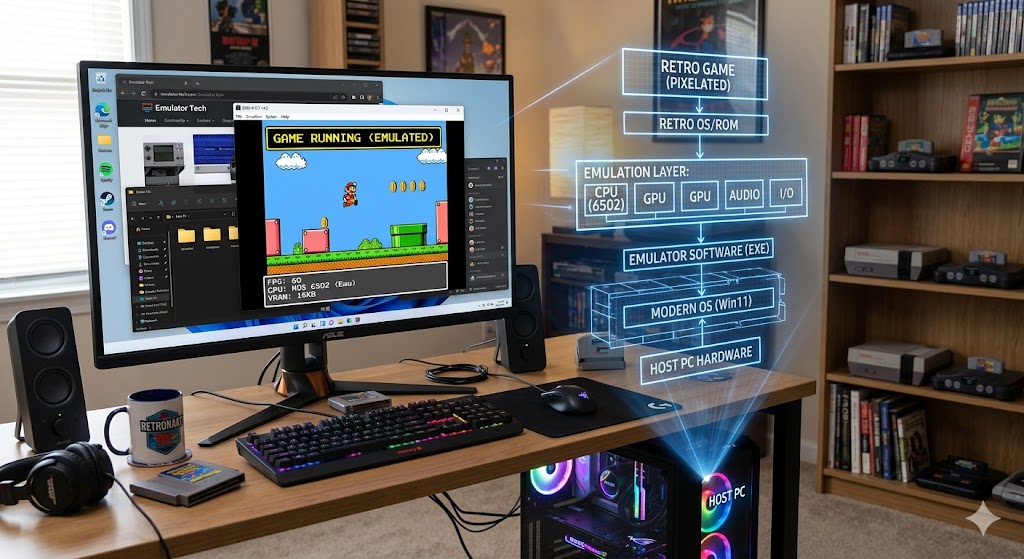
Image generated with CharGTP to show computer emulation.
As I am sure you have all become aware, I have renewed my interest in classic computing hardware and as a result, started looking for more information on them, what people and groups still use them, and what they are being used for. I have been surprised to learn that there are quite a few groups of people not only interested in learning about classic computers, but also avid users that still use their computers from the late 1970s and early 1980s. Most of them are used primarily for playing old computer games, but surprisingly some are still used for real working tasks.
A great example is the General Comprehensive Operating System (GCOS) systems designed and built by Bull/Honeywell in the 1960s. The operating system was designed by General Electric to run on these main-frame systems from the same era. As the years progressed and hardware improved, so did the operating system, with GCOS 7 and GCOS 8 coming out in 1979, running on newer models of these same main-frames. Sometime in the late 1980s, the market began to shift away from the mainframe, but so many very large business and government agencies had adopted GCOS as their main operating system for database management, it could not easily go away. There are still several state agencies running GCOS in an emulated environment today.
So what exactly is an emulator and why are they becoming such a large part of the modern computing infrastructure? Let’s just make it very simple—an emulator allows one type of computer or processor to run code designed for another type of computer. For example, the GCOS operating system was designed for DPS 7000 hardware, which was discontinued in the early 1980s. Emulators were written to allow this operating system to run on newer Motorola 68000 and IBM PowerPC minicomputers, and more recently, on modern Intel processors. This has allowed databases written as early as the 1960s to still be in operational use today.
The next best use for emulators is for those of us interested in studying the classic computing hardware; if you look hard enough you can find emulators for nearly every computer system ever built, including the ENIAC (1943), classified as the world’s first electronic computer, and even the Zuse Z1 (1938), which was a mechanical computer and the first to use binary codes to represent numbers. As I have dug deeper, I have found emulators for every generation of computers, but to me the most fun are the emulators from the 1980s-era computers, Commodore, Apple II, Atari and the TRS-80. Among that short list, you bring the capability of running over 100,000 software titles that are out of production and impossible to use unless you happen to have some old computers hanging around somewhere.
Emulation does not stop with the classic computing era, though to me that seems to be the most popular use, but it extends to modern computing as well. Did you know that you can use your computer to emulate several modern gaming systems to play Playstation and X-Box games on your computer? There are some borderline legal issues with emulation of modern hardware, but the best use for these modern emulators is in software development. Running your latest video game on an emulator allows you to monitor the game while it is running and look for areas of improvement, which is not possible on the real hardware. Emulation lets you see what is happening on the system in real time without using special hardware.
One of my favorite things to do is to run Android and iPhone emulators on my computer, which allows me to feed false data to the phone, for example, GPS locations. This allows you to play location-based games like the still popular “Pokemon Go” from your desk and explore remote areas of the world. This is, of course, considered cheating by the game developer and getting caught will result in getting your account banned, but it is still a lot of fun using the emulator to trick the application.
Another very interesting use for emulators is in emulating microcontrollers, like the Arduino, which is used in home robotics. You can use a microcontroller emulator and circuit design software to virtually build robotics systems before you ever start to build the physical prototype. This is very helpful in designing robotics systems that could have dangerous results. A great example is when trying to build autonomous vehicles; emulating them in a virtual world is way safer than setting them free in the real world, on a test track, or especially on the city streets.
I would say in my almost forty-year career in the computing industry, utilization of emulator technology is at an all-time high. Businesses use it to run different types of systems from a single server or group of servers, running on another popular technology called virtualization, which I will write about next week. Put simply, virtualization allows one computer to act like many computers and when merged with emulation can turn your modern computer into several classic computers running at the same time and doing different jobs.
Scott Hamilton is an Expert in Emerging Technologies at ATOS and can be reached with questions and comments via email to shamilton@techshepherd.org or through his website at https://www.techshepherd.org.