Lesson 7 Homework Answers

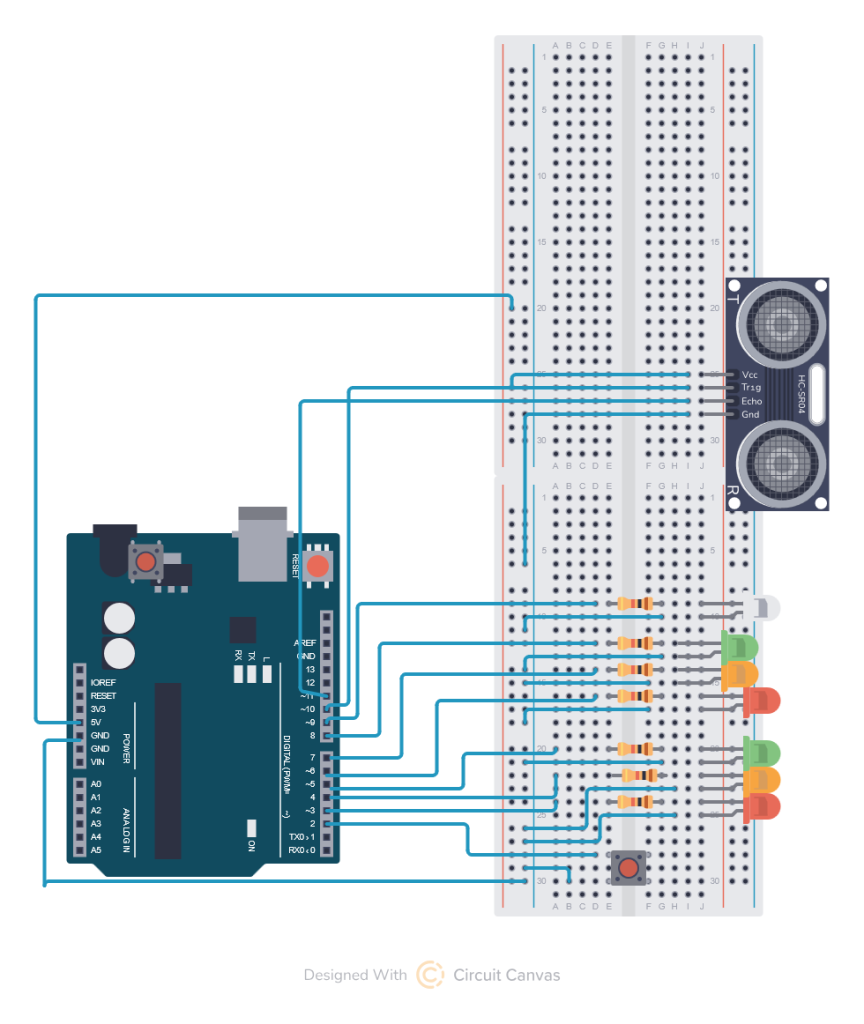
You circuit looks basically the same as Lesson 6 with the addition of the Sonar Sensor HC-SR04. It is a four pin sensor Pin 1 connects to 5V, Pin 2 connects to the trigger Pin, I chose pin 10, Pin 3 connects to the Echo Pin, I chose Pin 11, and Pin 4 connects to GND.
We talked about how the sensor works in Lesson 7 and now I will show you my code for how I wrote the controls, remember programming is a form of art and we may all do it differently.
//Define all the pins for the LEDs and sensors
int red1 =3;
int yel1 = 4;
int grn1 =5;
int red2 =6;
int yel2 =7;
int grn2 =8;
int walk =9;
const int trigPin = 10;
const int echoPin = 11;
float duration, distance;
int crosswalk = 2;
//set an interrupt variable for the push button
volatile bool buttonPressed = false;
//set an interrupt variable for the sonar sensor
volatile bool approached = false;
void setup() {
  //Setup the output pins for all the lights.
  pinMode(red1,OUTPUT);
  pinMode(yel1,OUTPUT);
  pinMode(grn1,OUTPUT);
  pinMode(red2,OUTPUT);
  pinMode(yel2,OUTPUT);
  pinMode(grn2,OUTPUT);
  pinMode(walk,OUTPUT);
  // Setup the crosswalk button notice the interrupt
  pinMode(crosswalk, INPUT_PULLUP);
  attachInterrupt(digitalPinToInterrupt(crosswalk), handleButtonPress, FALLING);
  pinMode(trigPin, OUTPUT);
  pinMode(echoPin, INPUT);
  Serial.begin(9600);
}

void loop() {
  // Here we send the signal we want to echo from the trigger pin.
  digitalWrite(trigPin, LOW);
  delayMicroseconds(2);
  digitalWrite(trigPin, HIGH);
  delayMicroseconds(10);
  digitalWrite(trigPin, LOW);
  // Next we measure how long it takes to get the signal back on the echo pin.
  duration = pulseIn(echoPin, HIGH);
  // We calculate the distance in centimeters based on the speed of sound in cm per second (0.0343 cm/s)
  distance = (duration*.0343)/2;
  // I chose a distance of 5 cm as an approach, you can go up to 40cm if you want.
  if (distance > 0 && distance < 5) {
    // Someone approached the crosswalk
    approached = true;
  }
  //This section of code executes only when the button has been pressed or an object is within 5 cm of the sonar.
  if (buttonPressed || approached) {
    //Makes traffic yeild
    digitalWrite(red1, 0);
    digitalWrite(yel1, 1);
    digitalWrite(grn1, 0);
    digitalWrite(red2, 0);
    digitalWrite(yel2, 1);
    digitalWrite(grn2, 0);
    delay (1000);
    //Makes traffic stop and walkers walk.
    digitalWrite(red1, 1);
    digitalWrite(yel1, 0);
    digitalWrite(grn1, 0);
    digitalWrite(red2, 1);
    digitalWrite(yel2, 0);
    digitalWrite(grn2, 0);
    digitalWrite(walk, 1);
    delay (5000);
    digitalWrite(walk, 0);
    //resets the interrupt
    buttonPressed = false;
    approached = false;
  }
    //loops through all the different light patterns.
    digitalWrite(red1, 1);
    digitalWrite(yel1, 0);
    digitalWrite(grn1, 0);
    digitalWrite(red2, 0);
    digitalWrite(yel2, 0);
    digitalWrite(grn2, 1);
    delay (2000);
    digitalWrite(red1, 0);
    digitalWrite(yel1, 1);
    digitalWrite(grn1, 0);
    digitalWrite(red2, 0);
    digitalWrite(yel2, 1);
    digitalWrite(grn2, 0);
    delay (1000);
    digitalWrite(red1, 0);
    digitalWrite(yel1, 0);
    digitalWrite(grn1, 1);
    digitalWrite(red2, 1);
    digitalWrite(yel2, 0);
    digitalWrite(grn2, 0);
    delay (2000);
    digitalWrite(red1, 0);
    digitalWrite(yel1, 1);
    digitalWrite(grn1, 0);
    digitalWrite(red2, 0);
    digitalWrite(yel2, 1);
    digitalWrite(grn2, 0);
    delay (1000);
}

//Activates the interrupt when the button is pressed.
void handleButtonPress() {
    buttonPressed=true;
}
You can do all kinds of different things with this is you want, for example:
- You could add a blink to the end of the walk signal turning off so the white light blinks to warn pedestrians that the light is about to change.
- You could add a beep using the speaker with one of the PWM pins, this would mean you need to move one of your LEDs as all the PWM pins are in use.
- You could add a constant beep using a regular pin and the passive beeper from the kit.
- You could modify the code so that if checks for the buttonpressed or approached everytime the lights turn yellow rather than once a cycle.
You can simplify the code by using an array of pins to drive the lights and making a call to a lights function with a series of 1s and 0s for which lights are on or off rather than turning them all on and off separately. It makes it harder to read and understand but makes the code smaller and faster.
We will go over some of these in class today after we make sure everyone has a working circuit.